Real-time hand & pose tracking in the browser (a MediaPipe follow-up)
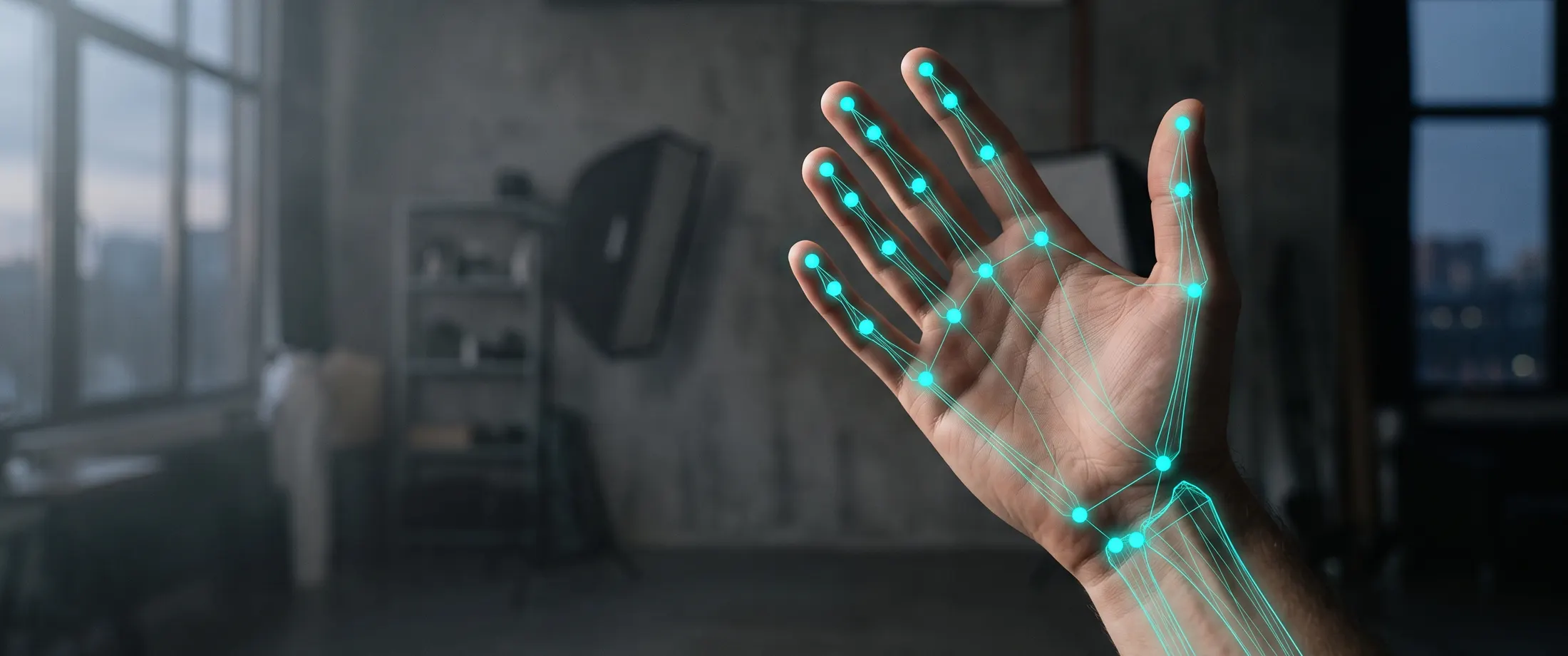
Our face-tracking tutorial drew a 478-point mesh from a single HTML file. Same recipe, new signals: this follow-up tracks 21 hand landmarks and 33 body-pose landmarks live in the browser, then turns a pinch into a click. No bundler, no server, no install step.
1. The recipe, recapped
If you did the face post, this will feel familiar: one file, MediaPipe (Google’s on-device ML library, Apache-2.0) loaded from a CDN, getUserMedia for the webcam, and a <canvas> overlaid on the video. The one prerequisite that trips everyone up: getUserMedia only runs in a secure context (https:// or localhost), and it fails silently otherwise. Here’s the skeleton; the module script from sections 2–5 slots into the <script type="module">.
<!doctype html>
<html lang="en">
<head>
<meta charset="utf-8" />
<meta name="viewport" content="width=device-width, initial-scale=1" />
<title>Hand & pose tracking, no build tools</title>
<style>
body { margin: 0; background: #0a1214; color: #e8f0f0;
font-family: system-ui; display: grid; place-items: center;
min-height: 100vh; }
.stage { position: relative; }
video, canvas { width: 640px; max-width: 90vw; border-radius: 12px; }
canvas { position: absolute; inset: 0; }
#pinch { position: absolute; top: 8px; left: 8px;
font: 600 14px system-ui; padding: 4px 8px;
border-radius: 6px; background: #062a26; color: #2dd4bf; }
button { padding: 0.8em 1.6em; font-size: 1rem; border-radius: 8px;
border: none; background: #2dd4bf; color: #062a26; }
</style>
</head>
<body>
<button id="start">Enable camera</button>
<div class="stage" hidden>
<video id="video" autoplay playsinline muted></video>
<canvas id="overlay"></canvas>
<span id="pinch">pinch: —</span>
</div>
<script type="module">
// The code from sections 2–5 goes here, in order.
</script>
</body>
</html>2. Load MediaPipe Tasks: the right package
One detail is worth burning into memory, because the wrong version of it is a common copy-paste bug: the package is @mediapipe/tasks-vision, not @mediapipe/vision (that name doesn’t exist on npm; it returns a 404). Import the bundle, point the resolver at the matching WASM, and pin the version:
import { HandLandmarker, PoseLandmarker, FilesetResolver }
  from "https://cdn.jsdelivr.net/npm/@mediapipe/tasks-vision@0.10.35/vision_bundle.mjs";
const vision = await FilesetResolver.forVisionTasks(
  "https://cdn.jsdelivr.net/npm/@mediapipe/tasks-vision@0.10.35/wasm"
);
Then build both landmarkers from that vision fileset. The model files live under storage.googleapis.com/mediapipe-models; we use the GPU delegate and VIDEO mode, exactly as in the face post:
const handLandmarker = await HandLandmarker.createFromOptions(vision, {
  baseOptions: {
    modelAssetPath:
      "https://storage.googleapis.com/mediapipe-models/hand_landmarker/" +
      "hand_landmarker/float16/1/hand_landmarker.task",
    delegate: "GPU",
  },
  runningMode: "VIDEO",
  numHands: 2,
});

const poseLandmarker = await PoseLandmarker.createFromOptions(vision, {
  baseOptions: {
    modelAssetPath:
      "https://storage.googleapis.com/mediapipe-models/pose_landmarker/" +
      "pose_landmarker_lite/float16/1/pose_landmarker_lite.task",
    delegate: "GPU",
  },
  runningMode: "VIDEO",
  numPoses: 1,
});
(If a model URL ever 404s, MediaPipe has rotated its version folders before, so grab the current path from the Hand/Pose Landmarker guides linked at the end.)
3. Two skeletons: 21 hand points, 33 pose points
The counts are exact and worth knowing. HandLandmarker returns 21 landmarks per hand, for up to two hands. PoseLandmarker returns 33 full-body landmarks. (For contrast, the Face Landmarker from the previous post returned 478 landmarks plus 52 blendshapes. Hands and pose are far sparser, and correspondingly cheaper to run.) Pose ships in three tiers (lite, full, and heavy), trading accuracy for speed; start on lite and only move up if you need the precision.
Each landmark comes back normalized to 0–1, so you multiply by the canvas width and height to draw. The hand landmarks follow a fixed, documented map: the wrist is index 0, the thumb tip is 4, the index-finger tip is 8. We’ll lean on those in section 5.
4. Camera in, skeletons out
Wire getUserMedia to the button (user gesture + secure context), then drive inference with requestVideoFrameCallback, which fires in lockstep with the video. Unlike requestAnimationFrame, it won’t run ahead of new frames. Run both landmarkers per frame and draw their points.
const video   = document.getElementById("video");
const button  = document.getElementById("start");
const canvas  = document.getElementById("overlay");
const pinchEl = document.getElementById("pinch");

button.addEventListener("click", async () => {
  try {
    const stream = await navigator.mediaDevices.getUserMedia({
      video: { facingMode: "user", width: { ideal: 1280 } },
      audio: false,
    });
    video.srcObject = stream;
    button.remove();
    document.querySelector(".stage").hidden = false;
    video.addEventListener("loadeddata", startTracking, { once: true });
  } catch (err) {
    button.textContent =
      err.name === "NotAllowedError"
        ? "Camera blocked: check site permissions"
        : "No camera found";
  }
});

function startTracking() {
  canvas.width  = video.videoWidth;
  canvas.height = video.videoHeight;
  const ctx = canvas.getContext("2d");

  const dot = (p) => ctx.fillRect(p.x * canvas.width, p.y * canvas.height, 3, 3);

  const onFrame = (now) => {
    const hands = handLandmarker.detectForVideo(video, now);
    const poses = poseLandmarker.detectForVideo(video, now);
    ctx.clearRect(0, 0, canvas.width, canvas.height);

    ctx.fillStyle = "#64748b";                 // 33 pose points
    for (const pose of poses.landmarks ?? [])
      for (const p of pose) dot(p);

    ctx.fillStyle = "#2dd4bf";                 // 21 points per hand
    for (const hand of hands.landmarks ?? []) {
      for (const p of hand) dot(p);
      detectPinch(hand);
    }
    video.requestVideoFrameCallback(onFrame);
  };
  video.requestVideoFrameCallback(onFrame);
}
5. A pinch-to-click, from landmark geometry
You don’t need a gesture-recognition model for something this simple: a pinch is just geometry. Measure the distance between the thumb tip (4) and the index-finger tip (8) in normalized space; when it drops below a small threshold, call it a pinch. A little hysteresis (separate on and off thresholds) stops it flickering on the boundary.
const THUMB_TIP = 4, INDEX_TIP = 8;          // MediaPipe's fixed hand-landmark map
const PINCH_ON = 0.05, PINCH_OFF = 0.08;     // normalized distance, with hysteresis
let pinched = false;

function detectPinch(hand) {
  const a = hand[THUMB_TIP], b = hand[INDEX_TIP];
  const dist = Math.hypot(a.x - b.x, a.y - b.y);   // in normalized 0–1 space
  if (!pinched && dist < PINCH_ON)  { pinched = true;  onPinch(); }
  if ( pinched && dist > PINCH_OFF) { pinched = false; }
  pinchEl.textContent = pinched ? "pinch: down" : "pinch: —";
}

function onPinch() {
  // your "click" fires here
  document.body.animate(
    [{ filter: "brightness(1.4)" }, { filter: "brightness(1)" }],
    { duration: 150 }
  );
}
Tune PINCH_ON/PINCH_OFF to your camera and framing. It’s a relationship between two points, not a calibrated absolute distance, so it shifts with hand size and distance from the lens. That’s the whole trick behind most “touchless” interfaces: landmark distances and angles, thresholded into events.
6. Performance, and where it breaks
The GPU delegate is markedly faster than the CPU/WASM fallback, and among the pose models heavy costs more than full, which costs more than lite. Exact frame times depend entirely on the device, the browser, and how many hands and bodies are in view, so measure on the hardware you actually target, not your dev laptop. (I’m deliberately not quoting numbers here; they’d be fiction for your setup.)
Two caveats, the same two as the face post. First, secure context: nothing happens on plain http://. Second, and more important for anything real: a CDN import is a live supply-chain dependency, executable code you don’t control, re-resolved on every page load. This single-file pattern is ideal for prototypes; for production, pin exact versions (as above) and vendor the library and the model files into your own hosting rather than trusting a live CDN. Gesture interfaces and camera-driven try-on are the kind of on-device computer vision CloudSignal builds and reviews. If you’re taking a demo like this toward production, get in touch.
Sources / further reading
- MediaPipe Hand Landmarker guide (Google AI Edge): https://developers.google.com/edge/mediapipe/solutions/vision/hand_landmarker
- MediaPipe Pose Landmarker guide (Google AI Edge): https://developers.google.com/edge/mediapipe/solutions/vision/pose_landmarker
@mediapipe/tasks-visionon npm: https://www.npmjs.com/package/@mediapipe/tasks-visionrequestVideoFrameCallback(MDN): https://developer.mozilla.org/en-US/docs/Web/API/HTMLVideoElement/requestVideoFrameCallback- Companion tutorial: Real-time face tracking in the browser (/blog/browser-face-tracking-tutorial/)
Written by Ashwin Rajendraprasad for CloudSignal AI. The code above is free to reuse.